Junk removal company invoice template
Invoice Koi's free invoice template for junk removal companies puts the half and full truck loads and the labor per crew member above the disposal charges, so the fees for a refrigerator or a mattress are a line rather than a surprise. Add your prices and save the PDF.
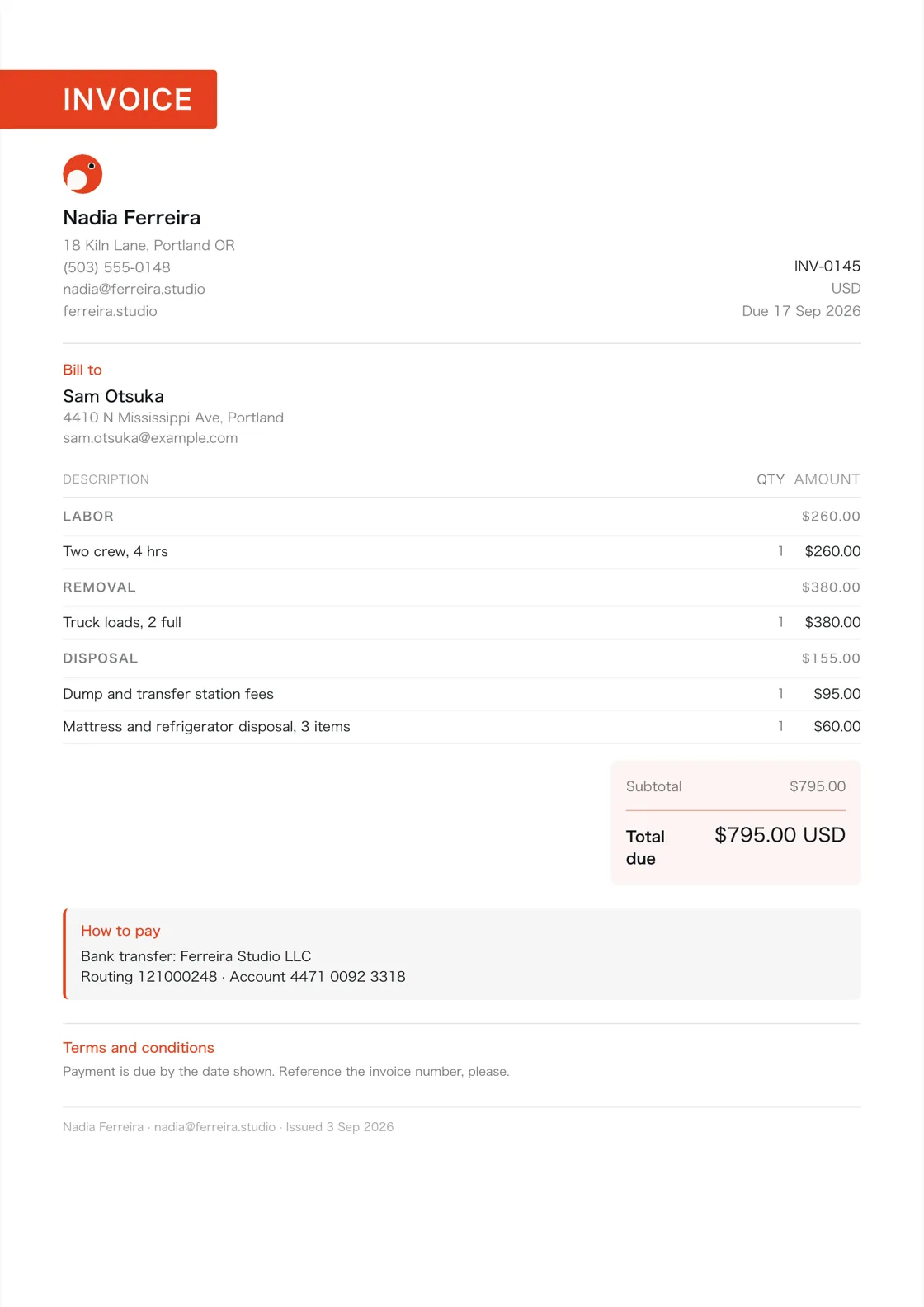
The lines junk removal companies
actually bill.
Open the generator from this page and these are already in the document, with their units set. Put your own prices against them, add your logo, and save the PDF.
| Line | Unit |
|---|---|
| Truck load, half | each |
| Truck load, full | each |
| Labor, per crew member | hrs |
| Dump and transfer station fees | job |
| Refrigerator, mattress or tire disposal | each |
| Single item pickup | each |
| Site visit and estimate | each |
No rates against the lines, on purpose. What you charge is yours, and a suggested hourly rate published on a web page is a number somebody sends to a customer without meaning to. The figures beside it are one worked job, not a price list.
Pick how it looks.
All nine come with the app's subscription, on every document, with your logo and one of five accent colors. Each is named after a koi variety and drawn to answer to it, and the pictures are the real thing, printed by the renderer that draws the PDF your customer opens. Scroll through them.
-

 01 / 09
Kohaku
Red on white
On the page. Left letterhead, serif title and facts on the right, with a subtle accent.
-

 02 / 09
Sumi
The ink itself
On the page. Minimal letterhead, a slim accent at the top and an unruled table.
-

 03 / 09
Asagi
A blue net, laid straight
On the page. Centered title between rules, with the parties in two columns.
-

 04 / 09
Ogon
One metal, nose to tail
On the page. Bold accent header, shaded rows and a highlighted grand total.
-

 05 / 09
Tancho
One red circle, centered
On the page. Large title and document facts in a ruled box beside the letterhead.
-

 06 / 09
Utsuri
Black answering a second color
On the page. Left-column letterhead and a table ruled across and down.
-

 07 / 09
Shusui
One row of scales, down the spine
On the page. Centered letterhead, title and facts, framed by paired rules.
-

 08 / 09
Goshiki
Five colors in one fish
On the page. Corner title tab, two-column parties and a panel grouping the totals.
-

 09 / 09
Chagoi
Tea brown, and no pattern
On the page. Letterhead on an accent panel, with a boxed table below.
About this template.
What goes on a junk removal company's invoice?
The lines above: truck load, half, truck load, full, labor, per crew member, dump and transfer station fees, and the rest of what junk removal companies bill for, each with the unit it bills in. Open the generator from this page and they are already in the document, waiting for your own prices.
Why are there no rates against the lines?
Enter your own rates. The line items show what to bill and the units to use. Priced examples illustrate the totals, not recommended charges.
Can I change the lines?
Yes. They are a starting point rather than a form. Add, rename and delete them, and in the app the price book keeps whatever you settle on so the next invoice starts from it.
What file do I get?
A PDF. The generator saves one through your browser's print dialog, and the app draws one on the phone. There is no Word or Excel version.
Do I need to sign up?
No. The generator asks for nothing, and the app works before you make an account.
On Google Play now. Coming soon to iPhone. Have the app? Open it
-
 Electricians
-
 Plumbers
-
 HVAC contractors
-
 General contractors
-
 Carpenters
-
 Roofers
-
 Painters
-
 Landscapers
-
 Cleaning businesses
-
 Handymen
-
 Tile installers
-
 Flooring installers
-
 Drywall contractors
-
 Mobile mechanics
-
 Pest control technicians
-
 Appliance repair technicians
-
 Garage door technicians
-
 Locksmiths
-
 Pool service technicians
-
 Pressure washing contractors
-
 Window cleaners
-
 Carpet cleaners
-
 Tree services
-
 Fence contractors
-
 Irrigation and sprinkler contractors
-
 Designers
-
 Developers
-
 Writers
-
 Consultants
-
 Photographers
-
 Videographers
-
 Event planners
-
 Hair stylists
-
 Tutors